for($i = 1; $i -lt 101; $i++ ) {
for($j=0;$j -lt 10000;$j++) {
#we could do something here
}
Write-Progress "Search in Progress" "$i % Complete:" -percentComplete $i;
}
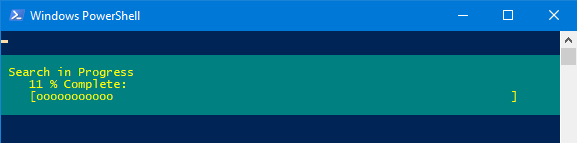
Display a progress bar.
Syntax
      Write-Progress [-activity] string [-status] string [[-id] int]
             [-percentComplete int] [-secondsRemaining int]
                [-currentOperation string] [-parentId int]
                   [-completed] [-sourceId int] [CommonParameters]

Key
   -activity string
       A string that describes the activity about which progress is being reported.
       Will appear as the first heading above the progress bar.

   -status string
       A string that describes current state of the activity about which progress
       is being reported. Will appear as the second heading above the progress bar.

   -id int
       The activity identifier for this progress record.

   -percentComplete int
       The percentage of the activity that is completed.
       Use the value -1 if the percentage is unknown or not applicable.

   -secondsRemaining int
       The projected number of seconds remaining until the activity is completed.
       Use the value -1 if the number of seconds remaining is unknown or not applicable.

   -currentOperation string
       Describes the operation that is currently taking place.

   -parentId int
       The parent activity of the current activity.
       Use the value -1 if the current activity has no parent activity.

   -completed
       Hide the progress bar, to indicate the activity is complete.

   -sourceId int
       Identify the source of the record
Write-Progress displays a progress bar in a PowerShell command window that depicts the status of a running command or script.
The progress bar will automatically disappear when the command/script is done, it can also be hidden by using -completed, note that -activity is still a mandatory option but when completing it can be set to any non empty string even just a space:
Write-Progress -Completed -Activity ' '
PowerShell 7.2 added the $PSStyle automatic variable that’s used to control how PowerShell displays certain information using ANSI escape sequences. The $PSStyle.Progress member allows you to control progress view bar rendering.
$PSStyle.Progress.Style - An ANSI string setting the rendering style.
$PSStyle.Progress.MaxWidth - Set the max width of the view. Defaults to 120. The minimum value is 18.
$PSStyle.Progress.View - An enum with values, Minimal and Classic. Classic is the existing rendering with no changes. Minimal is a single line minimal rendering. Minimal is the default.
Display progress of a nested for loop:
for($i = 1; $i -lt 101; $i++ ) {
   for($j=0;$j -lt 10000;$j++) {
      #we could do something here
   }
   Write-Progress "Search in Progress" "$i % Complete:" -percentComplete $i;
}
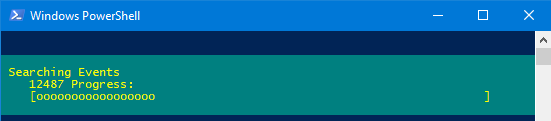
Display progress while searching through the system event log messages:
$events = get-eventlog -logname system
$events | ForEach-Object -begin {clear-host;$i=0;$out=""} -process {
   if($_.message -like "*bios*") {
      $out=$out + $_.Message
   }; $i = $i+1;
      Write-Progress -activity "Searching Events" -status "$i Progress:" -percentcomplete ($i/$events.count * 100)
} -end {$out}
“I don’t like to write, but I love to have written” ~ Michael Kanin
Write-Debug - Write a debug message to the host display.
Write-Error - Write an object to the error pipeline.
Write-Host - Display objects through the host user interface.
Write-Information - Write to the information data stream (6).
Write-Output - Write an object to the pipeline.
Write-Verbose - Write a string to the host’s verbose display.
Write-Warning - Write a warning message.